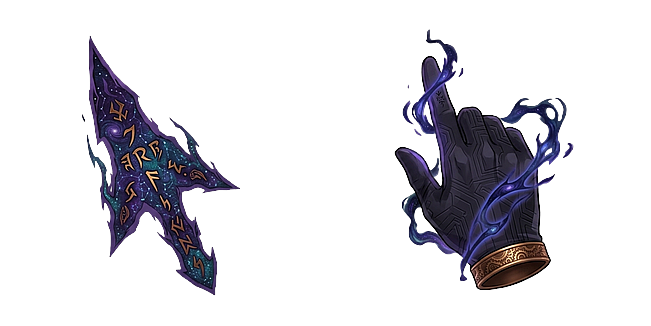
Monarch Hand & Shadow Arrow Solo Leveling Cursor

Monarch Hand & Shadow Arrow Solo Leveling

Pick CURSOR or POINTER, then tap the eye to make it live across the whole site.

Solo Leveling

Monarch Hand & Shadow Arrow Solo Leveling

Monarch Hand & Shadow Arrow Solo Leveling brings the powerful, dark anime aesthetic of the Shadow Monarch directly to your daily web browsing experience. Featuring a shadowy monarch hand combined with a dark aura shadow arrow, this custom mouse pointer provides an intimidating and legendary look for your desktop interface. Engineered for fluid tracking and high contrast visibility, it moves seamlessly across all website layouts, app windows, and dark mode backgrounds. Ideal for Solo Leveling fans, anime enthusiasts, and lovers of dark fantasy desktop customization, it instantly elevates your digital setup. Upgrade your browser pointer today and command every single click.

Collection
Added 29 times
— (0)

WHAT'S IN THIS DOWNLOAD

  • CUR Cursor — The main arrow you see while browsing.
  • CUR Pointer — The matching shape shown over links and buttons.
  • PNG Cursor image — A plain image of the cursor for previews or your own projects.
  • PNG Pointer image — A plain image of the pointer design.
  • PNG Roblox cursor — Sized for use as a Roblox cursor.
  • PNG Roblox pointer — Sized for use as a Roblox pointer.
Category
Anime
Collection
Solo Leveling
Style
Static
Files included
6

HOW TO INSTALL IT

  1. 1Install the free Neon Cursor extension from the Chrome Web Store — it also works in Edge, Brave, and Opera.
  2. 2Press the eye above to preview Monarch Hand & Shadow Arrow Solo Leveling live, then click Add to apply it.
  3. 3Refresh any tabs that were already open — new tabs pick it up automatically.
  4. 4Prefer it everywhere in Windows? Download the .CUR file and follow our Windows guide, or use the Roblox files with the Roblox guide.

Changed your mind? See how to remove or reset your cursor any time.

QUICK QUESTIONS

Is the Monarch Hand & Shadow Arrow Solo Leveling cursor free?

Yes. Like everything on Neon Cursor, this design is completely free to preview, add to your browser, and download. No account is needed.

How do I use this cursor in my browser?

Install the free Neon Cursor extension, then press Add on this page. The cursor will follow you across every website you visit; tabs that were already open just need one refresh.

Can I set it as my Windows cursor too?

Yes. Use the Download menu to grab the .CUR file and set it as your system pointer from Windows mouse settings.

More answers in the FAQ and the Help Center.

RELATED CURSORS